Free Website Hosting
Showing posts with label Free software. Show all posts

May 30, 2009

7 free Windows 7 tweaking utilities

Sent to you by pocketeer via Google Reader:

via Softwares and Learning of Encyclopedia by Ali Qayyum on 5/30/09
If you're running the Windows 7 RC, chances are good that you're the kind of user that likes to monkey around with settings and tweak your OS. While you can go the DIY route and hack your registry and run your mouse ragged clicking through various control panel screens, there are a number of good, free apps available designed to simplify tweaking.

Pro tip: if you run one of these apps, use their built-in checkpoint creator before committing changes or create a system restore point yourself - just in case something goes awry.


Here are five - go ahead and add your picks in the comments if you don't see your favorite listed!

EnhanceMySe7en (pictured above) - One strike against EM7 is that you must install it. On the plus side, it's 32 and 64-bit (native). On the minus side, it uses 65Mb memory when running. On the plus side, it comes with a free frogurt!

Joking aside, EM7 is absolutely packed with options. Apart from tweaks covering every nook and cranny in Windows 7, the program also includes CCleaner-like registry and disk cleaning tools, a shortcut creator, fast access to many built-in Windows utilities, and much, much more. It's a beast.


Little Tweaker - Lightweight, portable, and focused on common adjustments, Little Tweaker is a good option for those of you who want an uncomplicated way to manipulate the context menu, disk space warnings, and the like. it failed to run on x64, telling me that I needed to have Windows 7 Ultimate installed (which I do).


Ultimate Windows Tweaker [post] - It's impressive what the crew at WinVistaClub is able to cram into less than 200Kb. Ultimate was built for Vista, but it works just fine with Windows 7 as well. Loads of options cover everything from accounts and UAC to the taskbar and start menu and beyond. UWT is totally portable.

XDN Tweaker [post] - This one falls somewhere in between Little Tweaker and Ultimate. It's a good choice for the average user - not quite the overwhelming number of choices of EM7 or Ultimate, but more than just basic interface tweaks. XDn is available as both a portable and installable app.


Windows 7 Manager - As the name implies, this one boasts non-tweaking features as well. System cleanup, privacy tools, process monitoring, an uninstaller, a duplicate file finder, and a handy repair center are all included. On the tweaking side, everything from UI customization to network and IE settings is easy to monkey with. This one's available in 32 and 64-bit flavors as an installer only.


TweakNow Power Pack 2009 - Like EM7, TweakNow is much more than a tweaking tool. It also sports registry cleaning and tuning tools, a disk usage analyzer, history cleaner, startup manager, and more. The interface is well-organized, and if you can't find a setting you want to tweak with PowerPack it might not exist.

TweakNow is install-only, but it's worth doing for the additional built-in utilities (if you need them, of course). One big gripe: once I heard my fan spin up to tornado speed, I called up task manager. 48% CPU use. Ouch!


Things you can do from here:

Bookmark and Share

Free Norton AntiVirus 2009 Subscription for 180 days

Sent to you by pocketeer via Google Reader:

via Tips and Tricks Depot by Darmawan on 5/30/09


Feel free to choose your favorite skin

If you are still unsatisfied with your current free antivirus performance, in this post I'll show you how to legally get genuine Norton AntiVirus 2009 subscription for 180 days.
Most free antivirus has limitation compared to its paid-premium version. Free antivirus is designed to give you just a basic protection against viruses. Therefore, we can't expect too much from this freeware.

Latest version of Norton AntiVirus 2009 has received numerous praises from critics for its very light performance, high detection rate, and speedy scan. In the past, we often heard Norton is identical with 'Slow PC' but now that problem has been really solved by engineers in Symantec. Plus with nice interface, this latest version really rocks!

Some things that I personally like from Norton AntiVirus:

1.It has very low false-positive rate.
For whom that don't know, false positive is wrong detections by antivirus which detect clean files as infected ones. False alarm can give serious problem as well as real virus infection. When using this antivirus, I never get this false alarm.

2. Automatically repair the infected files
Norton really does a good job here. When using other antivirus, my flash-drive can't be opened again after the viruses are deleted by antivirus. The only way to open it by right clicking and Explore option. I'm sure many of you ever suffer this and it's really annoying.
Using Norton, it'll repair automatically the deleted registry caused by virus and now I can open my flash drive as usual. But, the repairing process take quite a long time, but it's very worth it.

Norton Multilayered Protection System

Here are some new features of Norton AntiVirus 2009:
Lightning Fast and Light as a Feather:
· Installs in under one minute on average.
· Requires less than 6 MB of memory—eight times less memory than the competitive industry average.
· Uses less than 50 MB of hard disk space (without definitions).
· Adds less than 3 seconds to boot time.
· Norton Insight technology scans only those files at risk, resulting in fewer, shorter, and faster scans of less than 35 seconds on average—almost five times faster than the competitive industry average.

Protection:
· Tiny, rapid Pulse Updates every 5 to 15 minutes—30 times more often than the competitive industry average.
· Norton Protection System delivers multilayered protection.
· Patent-pending, industry-leading protection from Web-based attacks.
· Real-time SONAR (Symantec Online Network for Advanced Response) technology detects emerging spyware and viruses before traditional definitions are even available.
· Specialized deep-cleaning technology delivers our most complete scan possible.

To enjoy full 180 days, you need to download from 2 different links, each link gives you free 90 days subscription. After the first 90 days subscription expires, just install the second installer resulted to total 180 days (6 months).
I don't know when this promotion will be over, so make haste before this great promo expires.

Download Links:
Free NAV 2009 90 days-1
Free NAV 2009 90 days-2


Things you can do from here:

Bookmark and Share

May 28, 2009

How To Create Your Own Community Website For Free

BoonEx Association Computer application Experts provides free, open-source and downloadable community-buildingcomputer application for websites. BoonEx delivers affection software, which enables you to body any affectionate of website: COMMUNITY, DATING, or SOCIAL NETWORKING. BoonEx has been alive oncomputer application development for added than 5 years and endeavors to advance aerial qualitycomputer application implementing the most recent internet technologies.

The BoonEx flagship artefact is Dolphin Smart Association Builder accouterment the basal belvedere for a website. This is accounting in PHP, HTML, CSS, AJAX application a MySQL database, and added avant-garde technologies such as RSS, JQuery etc. Dolphin is predominantly a Association and Social Network aggressive software, but, acknowledgment to avant-garde builders, the armpit ambassador is able to calmly adapt or adapt the armpit pages, remove/rename fields etc. to accomplish a armpit for dating - or any added affectionate of site. Dolphin couldn’t be alleged communitycomputer application after Flash Apps chip into Dolphin. Flash Apss are the afterward FLASH and PHP based applications: Audio/Video Chat, Audio/Video Instant Messenger, Video Recorder, Video and Music Players, Web Presence, Desktop Application, Shoutbox and Whiteboard which presents a armpit that is avant-garde and abounding of appearance to acquaint and accept fun with. To complete your Association site, BoonEx additionally developed and chip the Interactive Appointment Script into Dolphin which supplements your armpit with the accession of a altercation abode by accouterment groups and a forum.

Source : How To Create Your Own Community Website For Free
Bookmark and Share

May 25, 2009

Gold Wave Editor Pro - Powerful Audio Editing Software


Gold Wave Editor Pro

Today's give away from GAOTD is an attractive audio editing and mastering program which is quickly notching up an unusual number of appreciative comments on the GAOTD site. And no wonder! It sports a variety of rare features including, for example, a text to speech function which actually works rather well. My first impressions using this program have been uniformly excellent.

Here are some screenshots of Gold Wave Editor Pro user interface which will give you an idea of the program's capabilities, look and feel.

From the developer's description:

Features

* Included all the great features of Gold Wave Editor — and much more — with Gold Wave Editor Pro!
* Tools include Audio File Merger. Easy-to-use tool to merge audio files in one large file.
* Tools include Audio CD Ripper. Copies music tracks from audio CD’s and saves them as Ogg Vorbis, WAV and MP3 files. Free CDDB Supported.
* Tools include Audio CD Burner/Eraser. Create audio CDs from MP3 collection or WAV files.
* Change WMA metadata/WMA tags. Simple-to-use tag editor that allows you to change tagged information about your WMA music files.
* More professional. Gold Wave Editor Pro is designed to be a very easy and intuitive to use audio editing package. Within minutes you will be able to open or record a file and edit it. But if you take time to explore the other features you will find many powerful tools designed with the professional sound engineer in mind.

Interested? My advice is to download, install and register this commercial software for free today while you can. The license key is in the README file.
Bookmark and Share

May 20, 2009

YouTube Downloader: Download and Convert YouTube on yout PCs

YouTube Downloader is a nice free software utility to download and convert Youtube videos. It also allows you to download videos from Yahoo Video, Google Video, Daily Motion, and many others.

The best part of Free YouTube Downloader is its simplicity to use. You just pass the URL of YouTube videos, and it downloads the FLV file.
Download YouTube Downloader Free


Once the file has been downloaded, YouTube Downloader provides video conversion option to convert YouTube videos for Ipod, Iphone, PSP, Cell Phone, Windows Media, XVid and MP3. It also provides some other basic video editing options.

The whole software is very simple, light, and easy to use. Its really a nice little freeware that works very well. Download using the links at the end.

The program is easy to use, just specify the URL for the video you want to download and click the Ok button!
It also allows you to convert downloaded videos for Ipod, Iphone, PSP, Cell Phone, Windows Media, XVid and MP3.
You can use YouTube Downloader to download the videos of your choice from home, at the office or in school.
Download YouTube Downloader now and get started downloading your favorite videos from YouTube.
Bookmark and Share

May 14, 2009

Free multi platform CD/DVD Burner

ImgBurn supports a wide range of image file formats - including BIN, CUE, DI, DVD, GI, IMG, ISO, MDS, NRG and PDI. It can burn audio CDs from any file type supported via DirectShow / ACM - including AAC, APE, FLAC, M4A, MP3, MP4, MPC, OGG, PCM, WAV, WMA and WV.
You can use it to create DVD Video discs (from a VIDEO_TS folder). The latest version comes with support for HD DVD Video discs (from a folder HVDVD_TS) and Blu-ray DVD (from a BDAV / BDMV folder). The unique feature in ImgBurn is the DiscCheck function, essentially, it controls a drive 100% readable. Optionally, you can also have ImgBurn compare it to an image file to ensure the reality of the data is correct, it is difficult to avoid undesirable because of IO error. Download ImgBurn - DVD burning software.
FREE CD DVD Copy and Burn Software

FREE CD DVD Copy and Burn Software


Bookmark and Share

Making your own photo book from your PC freely

SmileBooks helps you turn your favorite digital photos into treasured photo books. Within minutes you can download SmileBooks free software and begin creating permanent photo book memories. When you're done, fill out the order form and within days you'll receive your incomparable quality photo book. Create memories that last a lifetime, in no time at all with SmileBooks photo books.

Download SmileBooks photo books software and create a photo book filled with your images, your ideas, and your memories. Compare SmileBooks quality, editing tools, and creative options. Chose our new lay-flat photo books printed on real photo paper, or select our digital print paper. With 7 photo book sizes to choose from and multiple cover designs, the possibilities are endless. Download SmileBooks photo book software for Mac or Windows today and discover the differences that are sure to bring miles of smiles. View our new photo book sizes and SmileBooks' new photo paper options. Create and customize a SmileBooks photo book with a simplicity you never dreamed possible. Select from over 400 backgrounds and more than 170 templates or customize each page to your own specifications. Wrap a favorite picture around the front and back cover, add text to the binding, put text anywhere you like, on any page. Use your own photo as a background for a page or make it a two page spread...If you like choices, SmileBooks has them. It's amazing how simple it really is to preserve your memories forever in a SmileBooks Photo book.
Bookmark and Share

May 1, 2009

Free..Cross-platform Audio Editor

Audacity® is free, open source software for recording and editing sounds. It is available for Mac OS X, Microsoft Windows, GNU/Linux, and other operating systems.

The latest release of Audacity is 1.3.7 (Beta). Because it is a work in progress and does not yet come with complete documentation or translations into foreign languages, it is recommended for more advanced users. See New Features in 1.3 for more information about the 1.3.x Beta series. Read more about Audacity

Bookmark and Share

Apr 28, 2009

12 Great Programs to Hide Running Windows Application from Your Boss

“All work and no play makes Jack a dull boy “. It is true that browsing the Facebook, playing simple games, listening to music, instant messaging with friends during work hours are unethical but in my opinion it is still okay to do it every once in a while, as long as it does not affect your work / productivity.

Having said so, if you have the boss from hell that did not tolerate all of the above activities, you can still do them at your own risk. Using softwares that are considered as a “boss key” application, you can hide all the windows / applications that you are currently using from your boss in an instant, with just a press of a shortcut key! Read more

Bookmark and Share

Apr 26, 2009

10 Free file encryption software for file security

File encryption is a good way to secure your website. There is a long list of paid software you can find around the corner but free software also help you lot like paid one. It is good idea to use free software and donate some money to the project for improvement. This way you can help many people. I personally a Linux user and I believe I don’t need any such software as my Linux is properly configured to handle my file from others. I test 2-3 software from the list and I must say all are good. Here is a big list, you can say a complete list of known free encryption software with publisher description. Hope you love it like my other articles.

Cryptainer LE : Simple, easy to use encryption application that creates encrypted “vaults”. One can store any kind of data in them. Cryptainer LE allows you to encrypt any file or folder on any Windows PC. Protects all types of Media and any type of data. Password protect any file or folder with strong Encryption. Send secure e-mail. Protects data on USB Drives, Flash Drives, CDs and HDDs.

CleverCrypt Lite : CleverCrypt enables you to create a secure ‘virtual drive’, where you can safely place all of your sensitive files.

FREE SafeHouse Explorer : It is FREE super-strong 256-bit encryption software for any hard drive or USB Flash memory stick. Total privacy with a familiar Windows Explorer-like interface.

AxCrypt : Is the leading open source file encryption software for Windows. It integrates seamlessly with Windows to compress, encrypt, decrypt, store, send and work with individual files.

FineCrypt Free : FineCrypt allows you to encrypt a limited number of folders and files (excluding ZIP, ARC, CAB, ARJ, TAR and GZ files). Encryption algorithms supported include MARS, RC-6, Rjindael (AES), Serpent, Twofish, and others.

Kryptel Lite : It is a free version of Kryptel. While it lacks some advanced Kryptel features, it is a fast and easy-to-use program, which will perfectly suit your needs if your security demands are not very high.

MEO Encryption : MEO is a powerful data encryption application to encrypt or decrypt files of any type, including Microsoft Word, Excel and PDF documents. MEO allows you to protect your sensitive data against un-authorized viewers by utilizing the latest data encryption technologies. Keep your documents safe and secure with this free data encryption software.

True Crypt : Creates a virtual encrypted disk within a file and mounts it as a real disk. Encrypts an entire partition or storage device such as USB flash drive or hard drive. Encrypts a partition or drive where Windows is installed (pre-boot authentication).

Ccrypt : It is a command-line utility for encrypting and decrypting files and streams. It replaces the old Unix crypt utility. Ccrypt provides strong encryption, based on the Rijndael cipher, the cipher that is also used in the Advanced Encryption Standard.

CryptMage : The Encryption Magician. Designed to be user friendly and secure. Unlike many other strong encryption applications you don’t have to be a cryptographer to use it. After encrypting the file using a proprietary algorithm, CryptMage uses a modified version of my Scrub secure file remover to insure the plain file will be unrecoverable.

Enjoy your file security...


Bookmark and Share

Apr 24, 2009

Free Mind Mapping Tool...DropMind

Seavus, a developer based in Sweden, has used Microsoft’s SilverLight technology to develop DropMind, a mind mapping application that is available in desktop and web-based versions, currently undergoing public beta testing. Both are well designed and show some significant promise. But some of their functionality (or lack thereof) left me shaking my head at times.

The DropMind web client

I found the DropMind web client to be well designed and easy to use. It offers a ribbon toolbar, which makes it easy to find the most frequently-used commands for creating and editing mind maps. Most common commands are grouped here, while the various map editing and enhancement functions are grouped in nested tabs in a vertical pane on the right side of the workspace.

I created a simple map with it, and found that it was very easy to add and edit topics, attach notes, icons and hyperlinks and to send invitations to share the map with others. The interface is well laid out and easy to understand. Multiple hyperlinks per topic are supported – which should be appreciated by business users. Everything was well behaved, and functioned as expected.

The DropMind web client offers what its developer calls a “four sphere map layout,” which it claims gives the user greater freedom to layout map topics. Most mind mapping programs distribute topics to the left and right of the main topic. Instead, drop mind distributes them equally above, below and to the right and left of the main topic - hence, the four sphere layout . This is apparently designed this way to maximize the use of the application’s workspace, since you can’t drag and drop topics from one location to another - not even to move a sub-topic from one parent to another. This seems like a strange omission, unless I just don’t understand how this aspect of how DropMind Web works.

The web client can import FreeMind and MindManager maps. From this online mapping tool, you can export your maps as an image, RTF document outline and to the desktop version of DropMind.

As you might expect, you can also share your maps with others, inviting them to view or collaborate on them. You can chat with others in real time, using using Google Talk, for enhanced collaboration.

One particularly cool capability of the DropMind web client is the ability to search online for images to add to your map. When you tell the program to add an image, a tabbed dialog box pops up that enables you to select from the icons included with the application, to browse your hard drive for one of your images or to perform an using the Flickr and Live image websites. It’s a very nice implementation!

In addition, DropMind Web can conduct Google and Delicious searches, using the text of the currently-selected topic as the search term. When I first decided to try these tools, however, I had a hard time finding their toolbar buttons - which were tucked below the right-side tools panel in an obscure location. Why aren’t these tools on the top toolbar?

Google search results are displayed in a pop‐up window within the application’s workspace; clicking on an individual search result opens the corresponding web page in another browser tab. How do you integrate the results of your search into your mind map? There isn’t an easy way. I tried to drag and drop one search result into my map, but nothing happened.

If you select a topic and do a Delicious search, the DropMind web client opens the search results in a new browser tab - different than the Google search functionality. Overall, I was disappointed that you can’t easily add the results of these searches to your maps. Ideally, this should be a drag-and-drop operation. According to the developer, future versions of DropMind will integrate with other social media services as well.

The desktop version of DropMind

The desktop version of DropMind (pictured above) works well, too, but I was a little disappointed with the fact that it doesn’t support the use of the “insert” key for adding new topics – almost a de facto standard in the world of mind mapping software. The program offers a selection of pre-defined map styles, but I found that many of the color schemes looked somewhat cartoonish for business use.

The desktop version of DropMind offers a surprising amount of flexibility when adding images to topics. By selecting the “image placement” button from the program’s toolbar, you can arrange the image above, below, or to the right or left of the topic text. Nice!

The program also provides numerous options for customizing your map background, including importing a background image and adjusting its transparency using a slider, and flipping or tiling the image. You can also choose from a range of solid background colors. Conveniently, DropMind ships with a modest selection of background patterns that you can easily use to customize the appearance of your maps.

DropMind offers a “focus” tool, which I thought would cause the map to be filtered to only display the currently selected topic and its children - so you can “focus” on developing its content. But instead, it only zooms the map in on that topic, while still displaying the entire map.

This program can import MindManager maps, and can export to PDF or image formats. Curiously, it doesn’t import FreeMind maps (but the web client does) and doesn’t export to RTF text outline format - which is essential if you start visually outlining an article or report in DropMind and then want to flesh it out in Microsoft Word.

Desktop/web integration

Seavus is only the second developer to introduce companion desktop and web-based versions of their mind mapping software; Mindjet was the first, with MindManager and MindManager Web, introduced in 2008. Ideally, this should allow for a seamless handoff of your maps between DropMind’s web and desktop versions. But unfortunately, this doesn’t seem to be the case. In order to do so, you must export it from one platform and then import it into the other. This seems clunky to me, and here’s why:

The gold standard that I use for comparison isn’t a mind mapping tool at all, but rather a web clipping/personal information manager called EverNote. It makes the process of keeping its desktop, web client and iPhone versions synchronized very easy. All you have to do is click the “synchronize” button and the programs do the rest. This is what applications like DropMind and MindManager (which utilizes a separate application called Mindjet Connect to move maps between the desktop and the cloud) should aim for.

DropMind is currently in public beta; the developer hopes to launch both the desktop software and the web client in early May. Pricing will be announced at that time. The initial release of the desktop version of DropMind will be for Windows, with Mac and Linux to follow soon after. If you’re interested in evaluating DropMind You can download a free trial of the desktop program or sign up for the web service on the DropMind website.

Conclusion

The desktop and web versions of DropMind show a significant amount of promise, but like any beta of a version 1.0 product, they’re a bit rough around the edges.

One of Seavus’ biggest challenges, in my opinion, is trying to carve out a unique offering in a market for desktop and web-based mind mapping tools that is already very crowded. Offering something that’s based on Microsoft’s Silverlight technology or arranging topics in four “spheres” don’t offer much added value to users, and therefore does little to differentiate DropMind in their minds. What’s needed are new capabilities that make it easier for users to accomplish common tasks. Better integration is also essential, so users can seamlessly synchronize their maps so they can access the latest versions of them from any computer with an internet connection.


Enjoy getting good idea...

Bookmark and Share

Apr 21, 2009

Free CD DVD burner...BurnAware Free 2.3.4

burnaware
BurnAware Free is a free CD, DVD, Blu-ray Disc burning software. It is ideal for users with basic disc burning needs as backup, creating data, audio, MP3 music, DVD-Video discs and burning disc images. Free, easy to set up, it enables you to save your files to disc quickly and provides clean, flexible interface to help you complete your burning tasks much faster.

What's new:
  • Updated translations.
  • Removed "Small Icons" option from "Add Files" dialog.
  • Fixed visual bug in "Options" dialog.
  • Fixed compatibility bug with DVD/Divx Video created by BurnAware and some DivX players.
  • Cosmetic improvements.
Download BurnAware Free 2.3.4

Enjoy your burning...
Bookmark and Share

Apr 18, 2009

Free Gantt Charting Tool

grant chart
Grant chart tool,If you’re low on funds, but still want to manage projects like the pros do, you may want to check out the free Gantt Charting tool - GanttProject. This project management and scheduling software boasts the ability to document and depict your usual Gantt-type task hierarchy and dependencies. Not only does it bust a move on your Gantt Charts, it also creates mean PERT charts — all of which can be exported to HTML reports, PDF reports and Microsoft Project. You can also (if you’ve given up on MS project) import your Microsoft Project .mpp file into GanttProject. Take a look.Grant Chart

It’s amazing what the concept of Open Source has done to the software industry. Realize, my friends, that "Open Source" is another way of saying "no support" — if you feel that your team needs project management software that works perfectly all of the time and that you should be able to call the vendor and complain to them every time you get stuck or it does something stupid.

  1. Microsoft Project is not for you.
  2. Open Source is not for you.
Bookmark and Share

Apr 16, 2009

MB FREE TAROT READING SOFTWARE 1.25 - 6.8mb (freeware)

Freeware
Free Tarot Reading Software1.25 6.8mb(freeware) - Download free tarot reading software.Free Tarot Reading Software is a mystic tarot card reading divination tool.

Tarot reading software can be used as a divination tool to know what your future has in store for you. Tarot cards have been used for fortune telling for ages and have remained popular ever since. They are seen as a means of getting in touch with the spiritual world. With time, newer and sophisticated decks evolved, thus making images on tarot cards more than just symbols. MB Free Tarot Reading Software also helps you improve your intuitive skills thus making you more sensitive to the unexplored psychic realm. The most commonly used and easy to understand deck is the Rider-Waite Deck. MB Free Tarot Reading Software also uses this deck for user understanding.

Enjoy to checking your future

Bookmark and Share

Apr 14, 2009

Microsoft DreamSpark - FREE Software For University And Now High-School Students Worldwide!

“Today, despite the economic crisis, it’s as important as ever to focus on investing in innovation so we can continue to make real progress in solving big problems and creating social and economic opportunity,” said Bill Gates, chairman of Microsoft. “In particular, I believe investment in education is essential. Education is the starting point for success for individuals and the prerequisite for economic growth and prosperity for communities. It’s vital that we support efforts to provide children with access to a high-quality education and adults with access to ongoing technology skills training.”

Microsoft DreamSpark is a program that provides no-cost access to Microsoft designer and development tools and training for verified high school and university students around the world, to support and advance their learning and skills through technical design, technology, math, science and engineering activities. Originally Microsoft DreamSpark was only available to University students, there have been nearly 2 million downloads from students around the world since its release.

Unlike University students, High School students do not sign up for DreamSpark themselves, the School Administrator does and receives product keys to hand out to the students. Next the students can sign in with their Live ID on the DreamSpark site and download the software.

The following software is available:

DreamsparkSoftware

Amazing, and who knows, maybe we’ll see some great Windows Live apps coming from these young developers (to be).

Bookmark and Share

Apr 12, 2009

Free Photo editor .. Photoscape relaesed version 3.3

photoscapephotoscape


I have introduce Photoscape last time and Now they have updated version

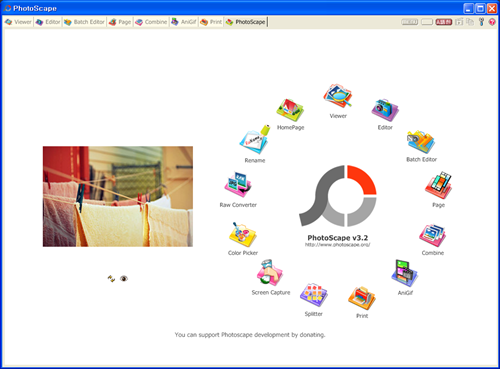
Free and fun software for photo edit "Photoscape" released version 3.3

Key Features
  • Viewer: View your folders photos, slideshow
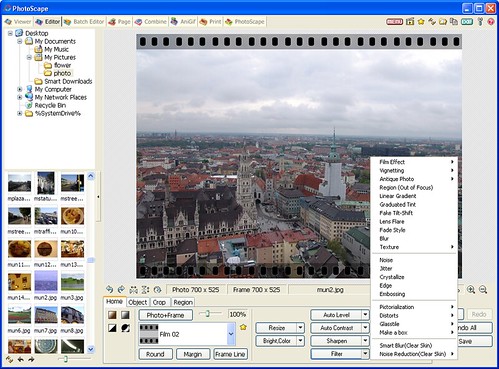
  • Editor: resizing, brightness and color adjustment, white balance, backlight correction, frames, balloons, mosaic mode, adding text, drawing pictures, cropping, filters, red eye removal, blooming
  • Batch editor: Batch editing multiple photos
  • Page: Make one photo by merging multiple photos at the page frame
  • Combine: Make one photo by attaching multiple photos vertically or horizontally
  • Animated GIF: Make one animation photo with multiple photos
  • Print: Print portrait shot, carte de visite, passport photo
  • Splitter: Divide a photo into multiple parts
  • Screen Capture: Capture your screenshot and save it
  • Color Picker: Zoom in screen on images, search and pick the color
  • Rename: Change photo file names in batch mode
  • Raw Converter: Convert RAW to JPG
Bookmark and Share

Apr 10, 2009

Free PDF to Word converter..Somepdf


Some PDF to Word Converter can help you to convert PDF to Word, so you can edit and reuse your PDF content. Using Some PDF to Word Converter you can preserve original layout, text, images, vector drawings of your pdf file.

Convert your PDF documents to Microsoft Word Documents - make your PDF content editing and reusable with Some PDF to Word Converter!

Some PDF to Word Converter Key Features

* Convert PDF files into Microsoft Word documents.
* Do not need Adobe software support.
* Accurately preserves Text, Tables, Graphics & Layout.
* Supports PDF1.6 protocol.
* Supports batch conversion.
* Automatically resize PDF page to fit your required Word page size.
* Batch PDF to Word conversion - convert multiple documents at once.
* Convert outer fonts into text and embedded fonts into images.
* Automatically links page numbers to all generated pages.
* Support page range conversion (all, from-to, individual pages).
* Support deletion of graphics and pictures from the generated Word document.
* Support encrypted PDF file.
Bookmark and Share

Apr 8, 2009

Freeware Creating NTFS Filesystem in USB Drives

Now usb drive getting bigger and bigger so you may need NTFS to getting more performance

Make u r USB more secure and efficientwith this nice Soft from HP.Format u r USB in NTFS file system which is more secure and efficient. .Prevent threats 2 u r USB. *U can also make u r USB bootable with this utility. This soft is from Hewlett Packard. AS you know NTFS is more faster and secure than FAT and FAT32 File System
Note:While formatting in NTFS Uncheck enable compression.If u check compression,u r USB will be slow.
Advantages: Enabling NTFS in removable storage devices allows us to add allow and deny permissions on individual files and folders for specific Windows users; that's the function not available in FAT file system. NTFS also allows files to be encrypted by using Windows XP’s built-in encryption.
Space on the storage device can also be improved due to compression capability.Last but not least disk quotas can also be set and even creating partitions!


Enjoy your storage performance
Bookmark and Share

Apr 6, 2009

Free multifunction media file converter

Format factoryFormat Factory is a multifunctional media converter.

Provides functions below:
All to MP4/3GP/MPG/AVI/WMV/FLV/SWF.
All to MP3/WMA/AMR/OGG/AAC/WAV.
All to JPG/BMP/PNG/TIF/ICO/GIF/TGA.
Rip DVD to video file , Rip Music CD to audio file.
MP4 files support iPod/iPhone/PSP/BlackBerry format.
Source files support RMVB.

Format Factory's Feature:
1 support converting all popular video,audio,picture formats to others.
2 Repair damaged video and audio file.
3 Reducing Multimedia file size.
4 Support iphone,ipod multimedia file formats.
5 Picture converting supports Zoom,Rotate/Flip,tags.
6 DVD Ripper.
7 Supports 45 languages

OS requirements: All 32 windows OS

Download Here

Bookmark and Share

Apr 4, 2009

50+ Free iPhone Apps to Make You Richer

The iPhone and iPod Touch are capable of a number of things, including helping you keep track of your money. From figuring out loan payments, to calculating tips and finding an ATM within your network so you won’t pay fees, there seem to be countless apps to choose from.

If you truly want to save money, then FREE applications are the way to go, and we’ve gathered up over 50 of them that will help you complete a multitude of tasks.

What are some of your favorite iPhone and iPod Touch financial apps?


Banking Applications


ibc bank

1st Mariner ATM/Branch Locator - Locate ATMs and branches in the 1st Mariner banking chain as well as the MoneyPass ATM network.

Bank of America - Look up your account balance, find nearby Bank of America branches, pay bills, transfer funds and more all right on your iPhone or iPod Touch.

Chase Mobile - Take control of your Chase account while on the go. Look up balances, pay bills, locate ATMs and more.

IBC Mobile - Check your accounts, make payments, conduct transfers, search for nearby locations and more.

Mobile Banking on AT&T - This mobile banking app will allow you to choose which institution to bank with from Chase, Citi Cards, Regions, Sun Trust, USAA or Wachovia.

PayPal - While PayPal is not an official bank, that doesn’t stop people from sending and receiving payments with it, and now you can use PayPal on the go.


Financial News & Price Quote Applications


bloomberg

Black Gold - Keep up to date with the ever fluctuating gold, oil and gas prices with this app that provides near real-time reports of these volatile markets.

Bloomberg - Keep up with the latest news, world market reports, your own portfolio, or look up new stocks with this handy application from Bloomberg.

eDerivaties - An application from Deustche Bank that lets you see how volatile the market is for equity indices and more.

Gold Price - See what the current buy & sell prices are for gold in US Dollars, British Pounds or Euros.

Kcast Gold Live! - This app will bring you the current values of precious metals such as gold, silver, platinum, palladium and even rhodium. See current quotes, charts and more.

Metal Quotes - Receive quotes for gold, silver, platinum and palladium. Will also pull quotes from other world markets.

Oil and Gas - Check the prices and futures on barrels of crude oil, natural gas, heating oil futures and the average national price for gasoline.

RateWatch - Helps you keep an eye on all of the key interest rates.


International Finance Applications


canadian mortgage

Aussie GST - Helps you calculate the amount of Australian gross sales tax charged on an item.

BankSA Branch/ATM Locator - Allows you to locate BankSA branches and ATMs closest to you in Australia, and display them on the built-in map feature.

Canadian Mortgage Payment Calculator - Enter your down payment, your interest rate and the length of the mortgage, and see a breakdown of just about every type of payment schedule you can think of.

Credit Crunch - Assists you in calculating how much the new VAT rates in the UK are actually saving you.

Income Tax Calculator - Figure out what your take home pay is after the Australian government takes their share for a week, a fortnight or monthly interval.

Israel Money - This app will tell you current exchange rates for the Shekel, news related to the currency and how it is performing on the major indices around the world.

National Bank iBank - New Zealand’s National Bank’s iBank application allows you to check your accounts, view up to a full month’s transactions and more.

OCBC Bank - The Oversea-Chinese Banking Corporation application allows you to view your accounts, pay bills, check on transfers, see your rewards and more.

Options! - Check the Black Scholes analysis of European Call and Put options and the important Greek factors.

Shareprice - Mobile version of Shareprice.co.uk that keeps you informed with real-time stock quotes.

St. George Branch/ATM Locator - A simple application that helps you locate St. George ATMs and branches in Australia.

Thai Stock Watch - Watch the SET index, most active stocks, gainers & losers and a whole lot more.

Westpac Branch and ATM Locator - Locate Westpac, St. George and BankSA branches and ATMs all over Australia.


Loan and Mortgage Tool Applications


3in1 mortgage calculator

3in1 Mortgage Calc -3in1 Mortgage Calc will allow you to enter the mortgage amount, the length, the annual rate, your total gross income and more facts to get the most accurate monthly payment prediction possible.

Amortize -An easy to use mortgage calculator that can tell you what your monthly payments will be after you enter the amount of the loan, the interest rate and the length the loan is for.

EasyLoan - Enter the amount of the loan, the interest rate and the number of years, and EasyLoan will calculate what your monthly payments would be.

Loan-U-Later - Allows you to calculate loans and investments for as far out as you like based on the amount and the interest rate.

Mortgage Rates - See real-time mortgage quotes from hundreds of different lenders so you can shop around for the best rate at any time.


Personal Finance Applications


balance

Balance - A check registrar for multiple accounts that lets you keep a running tally right on the screen, helping to avoid ever being overdrawn again.

eMoney Mobile - A mobile application for eMoney account holders that allows you to see what your current personal wealth is at any time, make adjustments, access your financial accounts and more.

iBuxfer - Check your Buxfer account any time you want, take a look at your budgets, view pie charts of your spending and more.

iFIX 4.0 - This application will give you full control over the FIX protocol, allowing you to interact with the electronic exchange of security transactions.

ip Trader - An official solution for mobile trading with your TD Ameritrade account. You can use this app to enact trades, check balances, request stock quotes and a host of other features.

iStockManager - Another official application that allows you to access your TD Ameritrade account on the go. Features real-time streaming quotes, level II quotes, order status, news and several other features.

Mint.com - The popular Mint (Mint reviews).com personal finance tracker is also accessible from your iPhone and iPod Touch.

Moneytrackin - A simple app that allows you to track your finances while you are on the go.

Squirrel - Works with Squirrel Mac to sync your accounts and transactions, see all of your accounts in one window, rotate your device to see history graphs and more.

Vault - A simple money managing application that knows your banking institution and its phone number to help you find branches, allows you to keep track of expenses & payments and more.


Tip Calculation Applications


propina

CheckPlease - Quickly calculate tips on your bills by the percent you wish to give and the number of people in your party.

Propina - Enter the amount of the bill on the wheels, use the slider for the percent you want and then hit the number of people in the party to figure out each person’s share.

Quick Tip Tip Calculator - Once you enter your bill, use the slider to select a tip percentage and tell it to round up or down.

Simple Tip Calc - The name says it all as you just type in your bill, the percent you want to tip and you get a result.

Tip ‘n Go - Enter your check total with or without tax, set the tip amount and get a detailed breakdown of the bill.

TiPPeR - A fairly simple tipping application that was built over an argument on an Apple site. Has all of the usual features such as bill amount, percentage, bill splitting and so on.


Miscellaneous Finance Applications


checkplease

Amuck Moolah - A fun little time wasting game that makes money drop from the sky or just appear at the tap of your finger.

Cards - Store data about all of your credit cards and debit cards in this 256 bit encrypted application.

Converter Pro - Allows you to convert currency with up-to-the-hour updates of the currency rates.

CostCutter - Trying to figure out if cutting a specific expense will really save you money? Enter the amount to cut, if it is a daily, weekly or monthly expense, and CostCutter will tell you how much it will save you over various spans of time.

Debt Clock - Want to know what your share of the national debt is at all times? Debt Clock will show you a real-time calculation of how much each citizen of the United States theoretically owes.

GST Calc - Enter the amount of tax in your region, and then simply enter the price of what you wish to buy to see how much tax will be and the grand total.

Insurance Shopper - Helps customers across the United States shop for the most competitive rates on various kinds of insurance.

PayBack - Keep track of the expenses for a group trip and figure out how much each person’s share is when it’s over.

Bookmark and Share
Blog Advertising - Advertise on blogs with SponsoredReviews.com
Your Name :
Your Email :
Subject :
Message :
Image (case-sensitive):
Join My Community at MyBloglog!TopOfBlogs
Bookmark and Share
Subscribe in a reader